



How to set color mark to detect packaging in VFFS packing machine
2019-09-21

First, adjust the packaging machine empty bag packaging before opening the color mark.

Second,move the stopper ring on the rolling shaft of the packaging machine to the edge near the film.
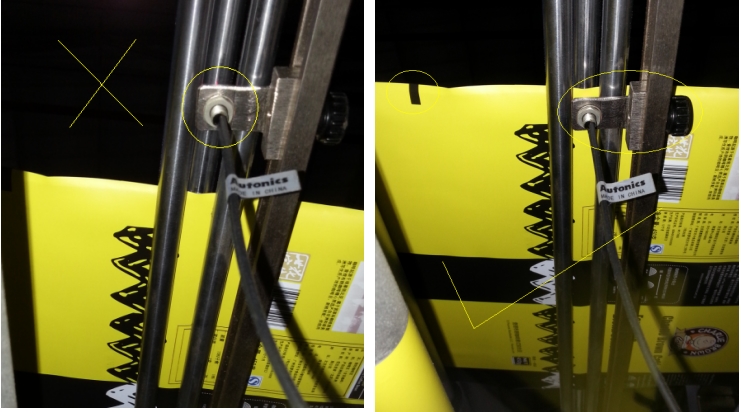
Next,move the color mark detection photoelectric eye to the edge of the packaging film with a color mark.
Then turn on the function of color mark .
Then ,setting bag length:
Set bag length to 350mm on the parameter page of the operation panel, measuring the distance between the two color mark is 320mm.Bag length seeting must be 30mm larger than the distance between the two color marks.
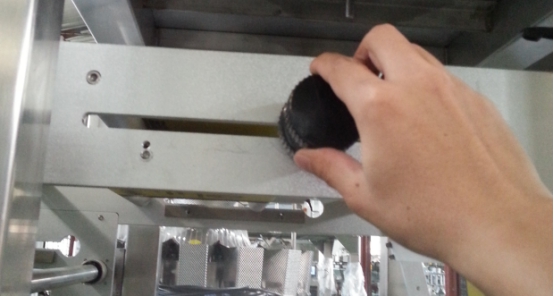
Last ,return to the manual page to make an empty bag to check if the bag is cutting in right position .If not , then adjust adjustment rod to the right cutting position .
ReviewsNumber of comments: {{ page.total }}
I want to comment?
{{item.nickname ? (item.nickname.slice(0, 2) + '*****') : item.source === 1 ? 'mall buyer' : '--'}}
{{item.comment_time}}
Review in the {{item.country}}
Reviews
Merchant
{{replyItem.nickname ? (replyItem.nickname.slice(0, 2) + '*****') : replyItem.source === 1 ? 'mall buyer' : '--'}}
{{replyItem.parent_nickname ? (replyItem.parent_nickname.slice(0, 2) + '*****') : '--'}}
{{replyItem.is_merchant_reply === 1 ? replyItem.reply_time : replyItem.comment_time}}
Review in the {{replyItem.country}}
Reviews

No customer reviews
About Smart Weigh
Smart Package Beyond Expected
Smart Weigh is a global leader in high-precision weighing and integrated packaging systems, trusted by 1,000+ customers and 2,000+ packing lines worldwide. With local support in Indonesia, Europe, USA and UAE, we deliver turnkey packaging line solutions from feeding to palletizing.
Send Your Inqulry
Recommended for you
Get in touch with us
Quick Link
Our Product
Packing Machine
Contact Us